Late afternoon at a store 300 km from the state capital, and the POS at register 2 dies. It won't turn back on. The line squeezes into a single register, customers see it growing and walk out, and the store loses sales. The manager files a ticket on the CSC's support portal (the shared services center), and the question that decides the rest of that store's week is: who drives out to fix it, and how fast?
The answer wasn't obvious, nor immediate. IT maintenance for the stores was split across three outsourced vendors, each responsible for certain equipment in certain stores. Send the ticket to the wrong company and you lose a full day to hear "that's not ours". And there was the clock: the contract set different deadlines depending on how far the store sat from the capital. Get that wrong and either the vendor gets charged against an SLA it never signed, or the store waits three days for an eight-hour fix. And until the right information reaches the right team, customers keep getting poor service.
Somebody had to make that call on every one of thousands of tickets.
I've watched this play out a few times. That store in your neighborhood, the one where you always grab a water or a juice from the fridge. One fine day the fridge stops working and you give up on the purchase because the water isn't cold. In my case, I spent six months watching that fridge sit broken, and of course my habit changed and I never bought there again, even after the fridge finally got fixed.
What ticket routing is
That act of deciding where each ticket goes has a name: ticket routing. It's the step between the customer hitting "send" and the ticket landing in the queue of whoever solves it. Every CRM does some version of it, from the bakery help desk to the bank contact center.
In a small operation, routing is a person. I've visited so many clients that this scene feels familiar by now. The supervisor opens the queue in the morning, eyeballs each ticket and deals them out. And that's fine: for twenty tickets a day, automating this is far from a priority. The ruler changes when the volume grows. At thousands of tickets a day, dealing the queue becomes a full-time job, and a bad one: repetitive, dull, the kind that makes a person question the meaning of life. A tired person sends the POS ticket to the monitor company, forgets the priority, applies the capital deadline to a store deep in the countryside. It isn't incompetence: it's being human at five in the afternoon, on ticket number eight hundred. (When the deadline gets applied at all, since tracking SLAs without a CRM demands a certain creativity with spreadsheets.)
A thousand stores, three vendors, ten equipment types
The case that taught me the size of this problem was a retail chain with over a thousand stores across Brazil. Ten types of IT equipment per store: monitor, desktop, POS, fiscal printer, barcode scanner, and so on. Three vendors splitting the maintenance of all of it.
Thing is, the right vendor didn't depend on the equipment alone. It depended on the equipment and the store. The same POS was serviced by one company in one region and by a different company in another, following each vendor's contract. If the rule were equipment-only, a ten-line table taped to the wall would do. With store and equipment together, the math changes: a thousand stores times ten equipment types is ten thousand combinations, each with an owner.
And on top of it all, the SLA. The contract had three deadline tiers by distance from the capital: stores in the metro area got one deadline, stores up to 100 km got another, and beyond that a third, because some repairs start with a technician hitting the road. Nobody routes that from memory. Or rather: somebody was routing it, and that somebody couldn't keep up anymore. The company had bought the CRM, but without the right configuration, what used to be done in a spreadsheet had simply become a sequence of clicks in the agent's interface.
The vendor matrix
The good news: the client already knew who handles what. The answer existed, alive and current, in a spreadsheet. Each line said: this store, this equipment, this vendor, this SLA.
At the discovery meeting, the scenario was clear. The data and the processes were already defined; what was missing was taking the manual execution out of the routing so the operation could scale.
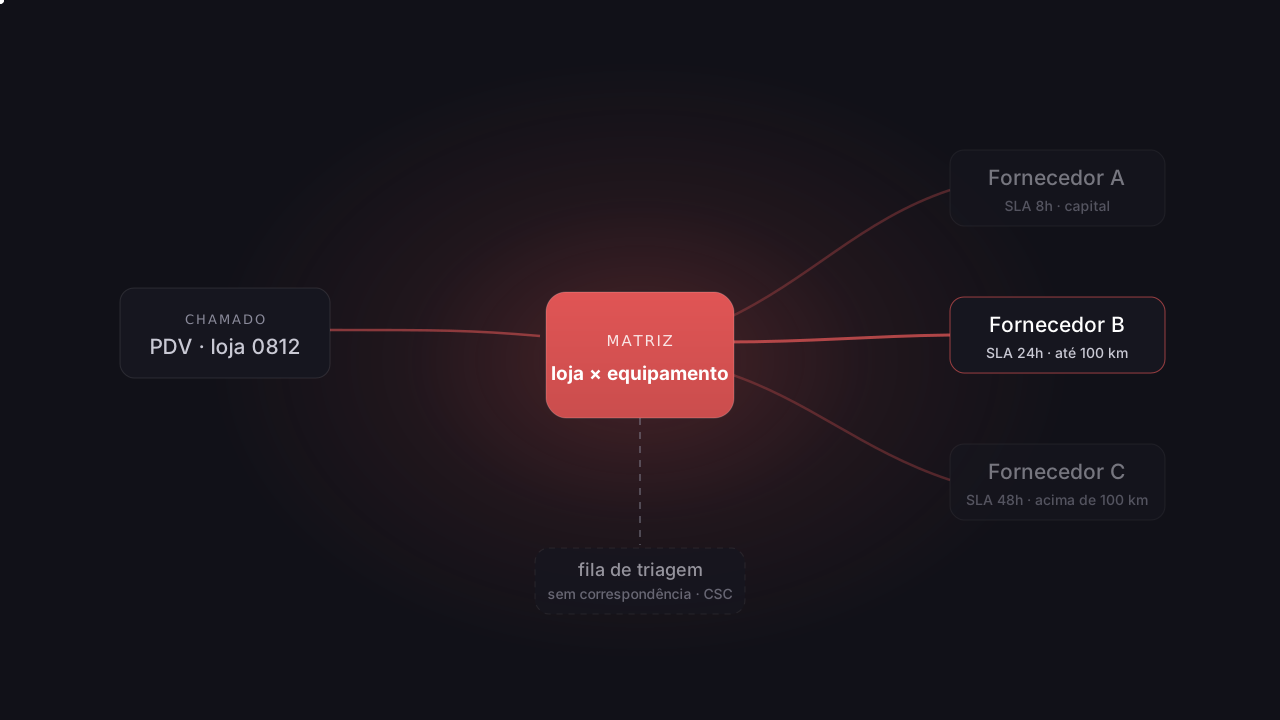
What we did was integrate that spreadsheet with the CRM. It was ingested as a custom object, which is the name CRMs give to a table of yours living inside the system: you define the columns, load the rows and, most importantly, automations can query it. We started calling it the vendor matrix, and it became the source of truth for the entire routing.
Nothing exotic: four columns and ten thousand rows, now sitting somewhere the automation can reach.
The automation (and the form that asks only the essentials)
Now the ticket's path. The store employee logs into the support portal, which only works logged in. And here comes a design decision that pays more than it looks: the form doesn't ask which store they're at. It doesn't need to. The CRM has an organizations feature, where every user belongs to one, and in our design each organization was a store. The ticket is born knowing where it came from. Store name, address, phone, tax ID, all of that already lives in the organization's record. What's left for the person is picking the equipment from a ten-option dropdown and describing the problem.
Store, address, phone, tax ID: all of it comes from the login.
SubmitThe moment the ticket is created, the automation kicks in. It reads the two fields that matter, store and equipment, and looks up the matching line in the matrix. If it finds one, it does two things: assigns the ticket to that line's vendor group and applies that line's SLA. The three vendors' technicians worked as agents inside the client's CRM, each company with its own group, so routing meant delivering the ticket straight into the queue of whoever fixes it, with the SLA clock already running and visible to everyone. From form submission to the ticket sitting in the right queue: under a second, touched by no one.
Store
from the login, via organizationEquipment
dropdown, ten optionsLookup: store + equipment
Vendor group
assigned instantlySLA applied
the store's distance tierTriage queue
no match: the CSC decidesWhen the matrix has no answer
Sometimes the lookup comes back empty. The classic case was equipment outside the list: not everything in the store was under contract, only the main items. So when someone opens a ticket for something like the door sensor at the entrance, the automation has no way to guess the owner.
For those cases there was a triage queue. The unmatched ticket dropped into it, and the client's CSC, the shared services center, looked at each one and decided its destination by hand, getting quotes from other vendors. That way the CSC team spent its attention only on the tickets that genuinely required judgment, instead of having to act on the other thousands.
Who tends the matrix afterwards
Automatic routing has one dependency nobody gets to forget: the matrix has to keep up with the contract. A new store, a vendor switching regions, a renegotiated SLA tier: if the spreadsheet changed and the custom object didn't, the automation keeps routing, with full confidence, to the wrong place.
In our case changes were rare, a few times a year, and the process stayed the same as day one: the client updated the spreadsheet and we ingested it again. For an operation that touches its rules every week I'd recommend something else: a dedicated app, with its own screen for editing the rules directly, no spreadsheet in the middle. And there's a middle ground we've built for clients with a similar need and no appetite for the dedicated screen: a script that reads the Excel file and updates the custom object through the API. The spreadsheet stays the source of truth, in a format the contracts team already speaks, and nobody edits ten thousand records by hand.
What changed
The time between opening a ticket and it sitting in the right queue went from "whenever someone picks it up" to immediate, at any hour, Sunday included. The CRM that until then had been "expensive" started justifying its investment. This is my personal fight, reducing the entropy in customer service. As I tell my colleagues: as long as there's Excel, there will be chaos in the world.
In the end, it was a spreadsheet turned custom object and an automation that reads two fields, with no AI and no six-month project. If your operation looks anything like what I've described here, come talk it over with us at Red Lotus.
Leandro is the founder of Red Lotus Tecnologia, specialized in implementing, supporting, and evolving Freshdesk for support teams in Brazil.