“Where is my order?” Answered inside the ticket.
Melhor Envio Tracking is our Freshdesk app for stores that buy their shipping labels through Melhor Envio. The shipment sits in the ticket sidebar, whichever carrier took the parcel: status, carrier, tracking code, estimated delivery, and a flag when something is wrong. One click puts a ready status message into the reply, for the agent to review and send.
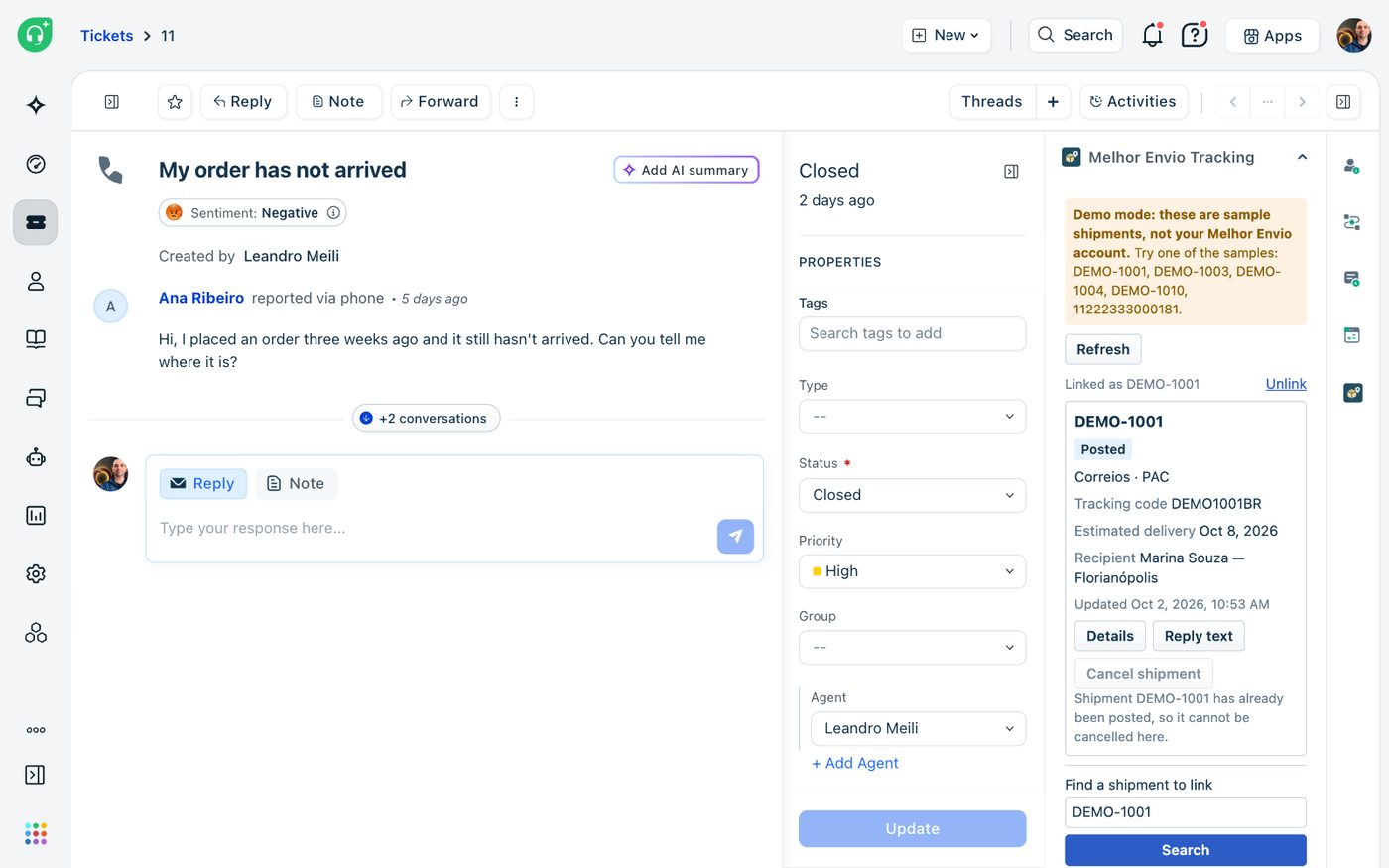
Search, link, answer.
The app runs inside Freshdesk and keeps no database. The shipments linked to a ticket are stored in a ticket field you choose, so views, automations and reports can use them. An independent app by Red Lotus. Not affiliated with Melhor Envio.
Find it and link it
One search box takes the protocol, the tracking code, the posting authorization code or the customer's CPF/CNPJ. If you want, the app also finds the protocols or tracking codes written in the ticket and links them for you.
See what is wrong
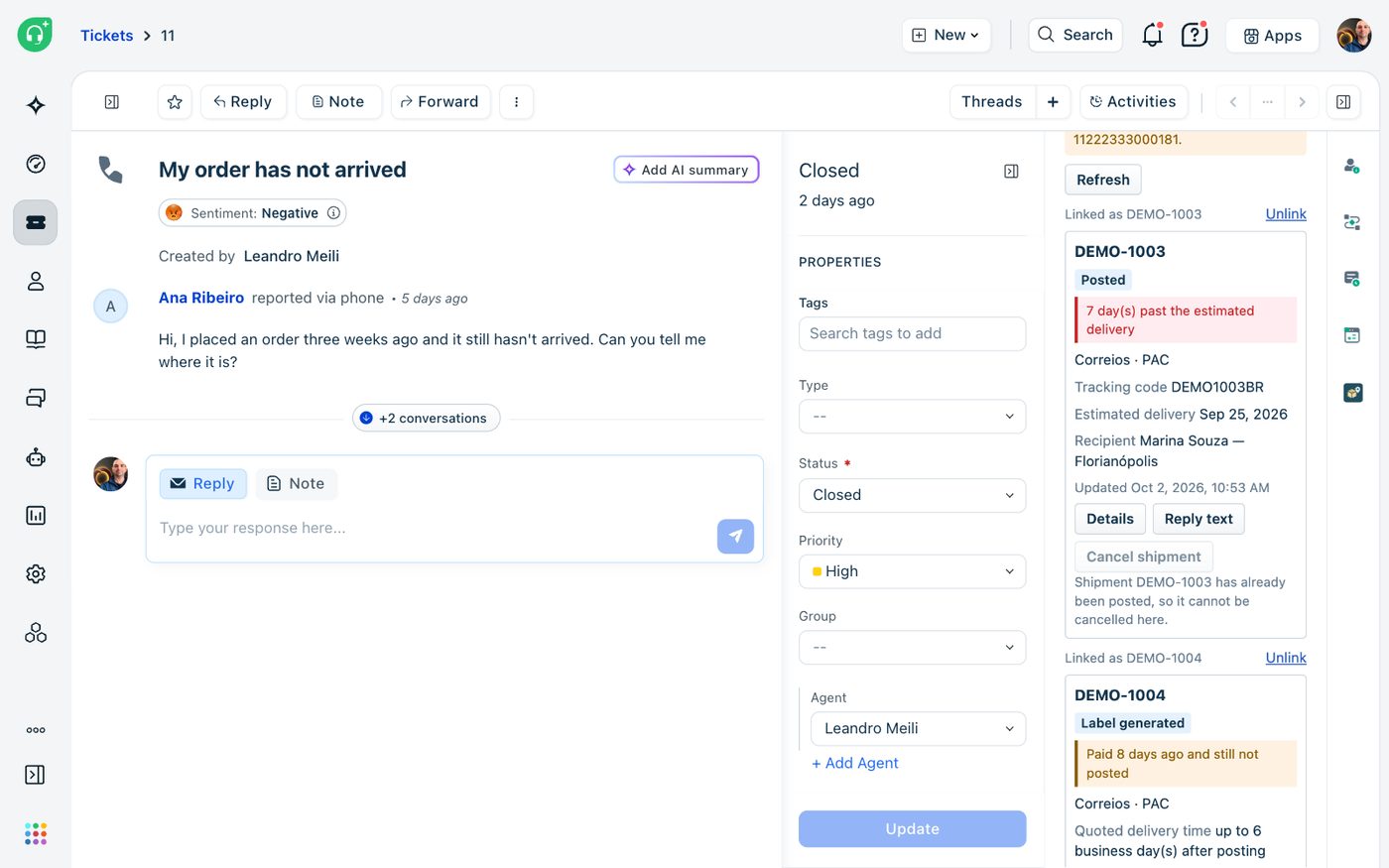
Late, not delivered, delivery paused, suspended, paid but never posted, label expired: each one is flagged on the card. The app also warns when the recipient of the shipment is not the person who opened the ticket.
Answer in one click
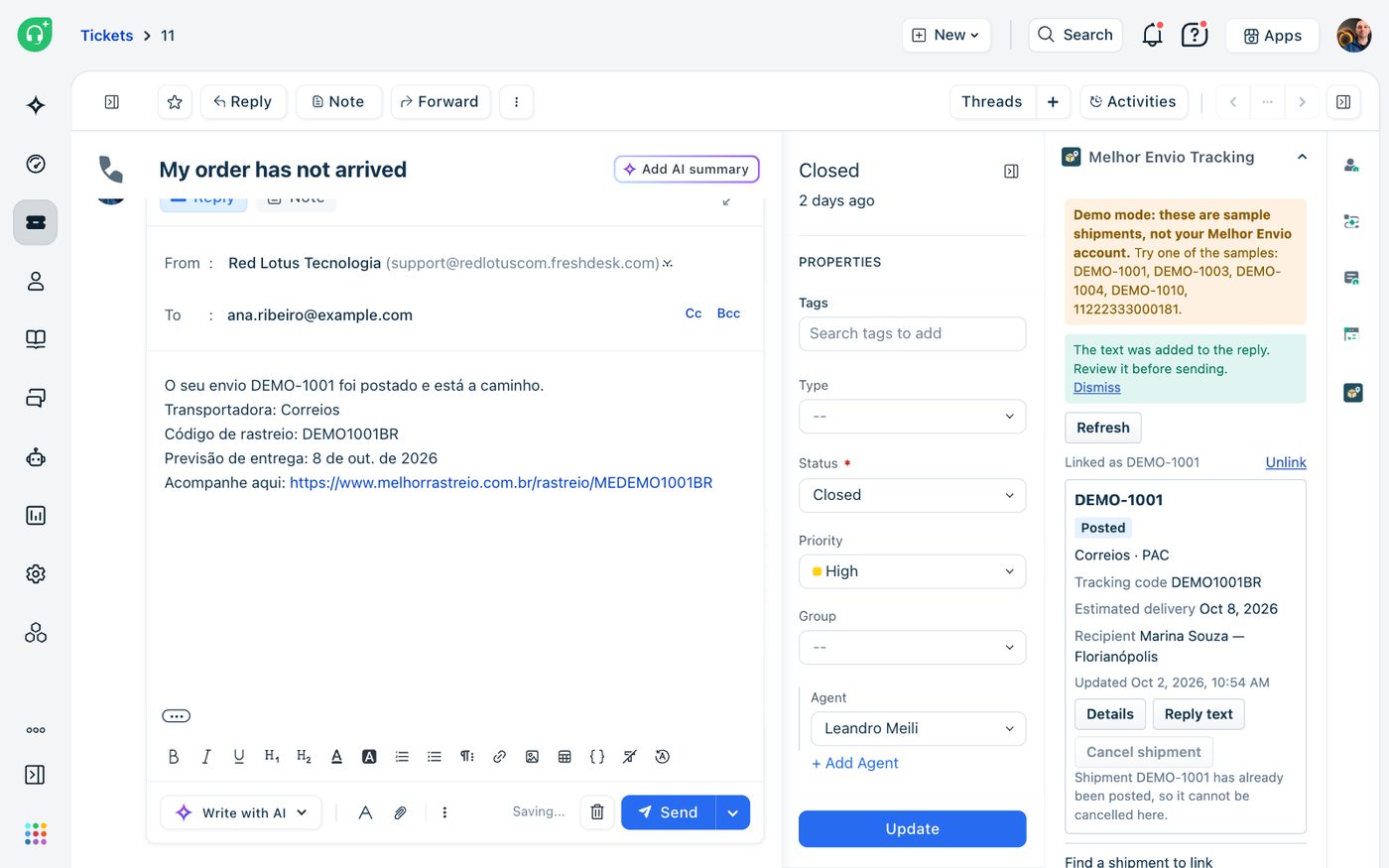
A status message in Portuguese or English, following the customer's language, goes into the reply editor. The agent reviews it and sends it. The app never sends anything on its own.
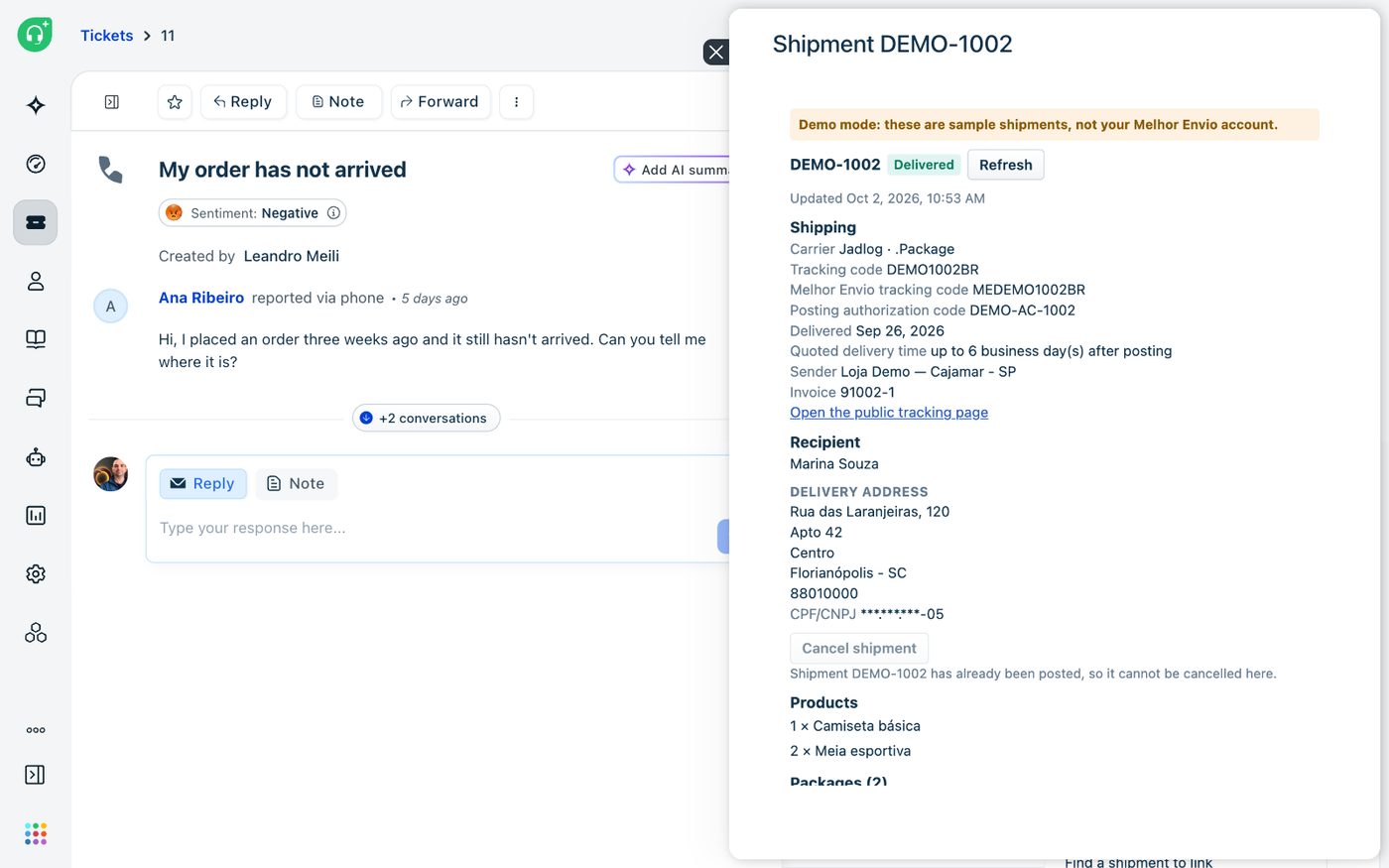
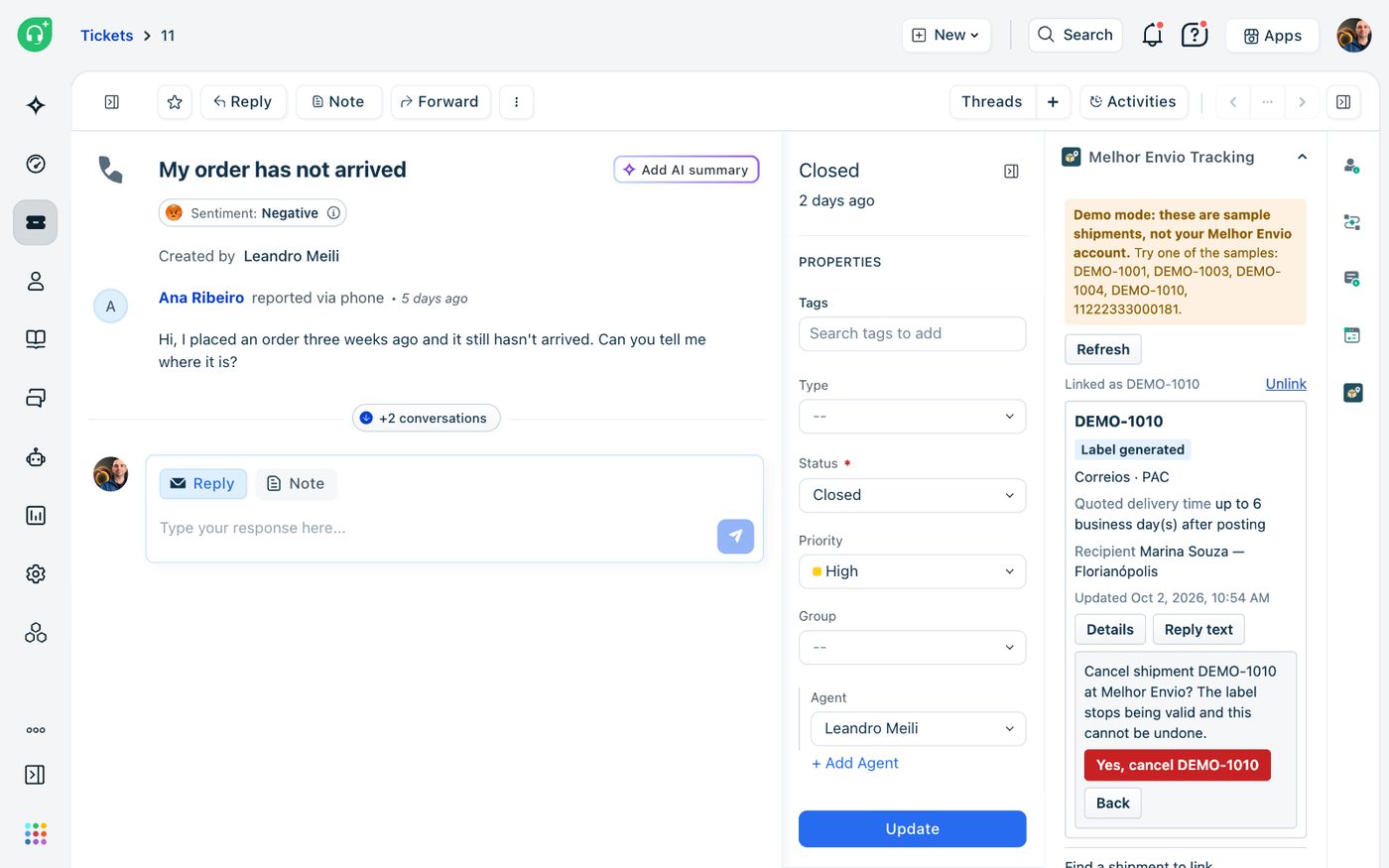
What the agent sees in the ticket.
Captured in a real Freshdesk account with the app in demo mode: every shipment, name, address and tracking code below is fictional, and the banner on each screen says so.
For stores whose support queue is made of parcels.
If your agents answer “where is my order?” all day, someone is copying a tracking code out of the Melhor Envio panel right now. With the app, the shipment is already in the ticket.
“Where is my order?”
The most common ticket any store gets. The answer is a status, a carrier and a date, and all three are on screen next to the conversation.
Late deliveries
The app works out the estimated delivery date from the posting date and the delivery time you were quoted, and flags the shipment once that date has passed.
Labels never posted
A label that was paid and has been sitting for days is flagged. You choose how many days count as too long.
Any carrier
Correios, Jadlog, Loggi, Azul Cargo, LATAM Cargo, J&T, Buslog: whichever carrier you bought the label from through Melhor Envio.
Reports by shipment
The linked protocols live in a ticket field of yours, so any Freshdesk view, automation or report can filter by them.
Nothing happens on its own
The app never sends a message to a customer, and cancelling is off until you switch it on.
About ten minutes to install.
Create the ticket field
One single-line text field, for example “Melhor Envio shipments”. Agents do not fill it in. The app does.
Generate a Melhor Envio token
In the Melhor Envio panel, under Integrações > Permissões de acesso, with permission to read shipments, and to cancel them if your agents will cancel from tickets.
Install
Paste the Freshdesk API key and the token, give a technical contact e-mail (Melhor Envio asks every integration for one) and choose the ticket field. The page checks the key and the token before it lets you install.
Open a ticket
The app is in the right sidebar. Search for a shipment and press Link. From then on it shows every time the ticket is opened.
Want to look before handing over a token? Tick Demo mode on the installation page and the app shows sample shipments without calling Melhor Envio once. It also works with the Melhor Envio sandbox. The interface is in English and Brazilian Portuguese.
The app stores nothing, and nothing reaches us.
The app has no database and no server of ours. Shipment data is held in the memory of the agent's browser page for up to five minutes and is gone when the page closes. It talks to exactly two services: Melhor Envio and your own Freshdesk. Two things are written, both into your Freshdesk account: the protocols of the linked shipments, in the field you chose, and a private note for each cancellation.
The Freshdesk API key and the Melhor Envio token are secure installation parameters. The Freshworks platform keeps them encrypted, adds them to the request on the server side and never sends them to the browser. Uninstalling the app removes them.
The cancellation rules are enforced on the Freshworks platform, not only in the browser: the installation switch, and the rule that a shipment can be cancelled only after it is paid and before it is posted. The sidebar shows the recipient's name and city. The full address and the CPF/CNPJ, with all but the last two digits hidden, appear only in the details window an agent opens.
Questions before you install.
How much does it cost?
USD 1.49 per Freshdesk agent per month. Freshworks does the billing, on your Freshworks account, and the Marketplace listing says whether a free trial is offered. We never see your payment details.
Is this an official Melhor Envio app?
No. It is an independent app by Red Lotus, not affiliated with Melhor Envio. It reads your shipments with a token you generate in your own Melhor Envio panel and can revoke at any time.
Does it show every carrier scan?
Melhor Envio's API gives the status and the dates of a shipment, not each carrier scan. For those, the details window links to the public tracking page. The estimated delivery date is calculated by the app from the posting date and the quoted delivery time, so it is an estimate, not a commitment of the carrier.
Does it send anything to my customers?
Never. The reply text is placed in the editor as a draft, and an agent decides whether to send it.
Can an agent cancel a shipment by mistake?
Cancelling is off until an admin switches it on. When it is on, it works only for a label that was paid and not yet posted, asks for confirmation, and writes a private note with the agent's name and Melhor Envio's answer. A cancellation cannot be undone, and Melhor Envio decides whether and when the amount is refunded.
Which Freshdesk plan do I need?
One with custom ticket fields and API access. The app writes through the Freshdesk API with a key you provide, so the agent who owns that key must be allowed to edit tickets and add notes.
Where do I get it?
It is on its way to the Freshworks Marketplace. Until it is listed, talk to us and we install it in your account as a custom app.
Answer “where is my order?” without leaving the ticket.
We install it, set up the ticket field and show your team how to use it. Come talk to us.
Back to all solutions