One email, three requests. Split it into three tickets.
Ticket Splitter is our Freshdesk app that turns any message on a ticket into a ticket of its own. Pick the customer reply, note or first message that belongs elsewhere, give the new ticket a subject, a team and an owner, and the attachments come along. Both tickets get a note linking to the other. When the original is done, close it with a reason the customer or your team can read.
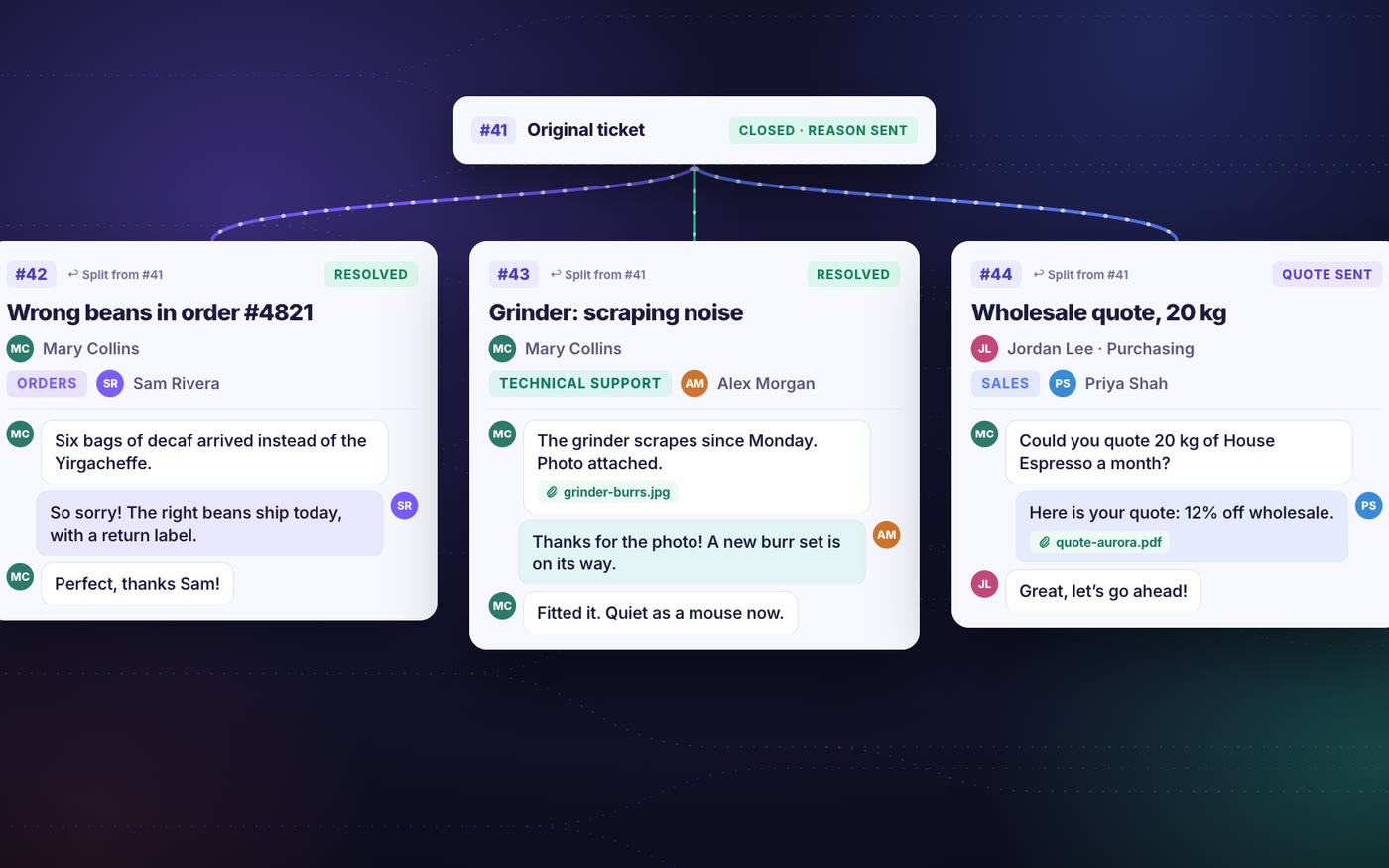
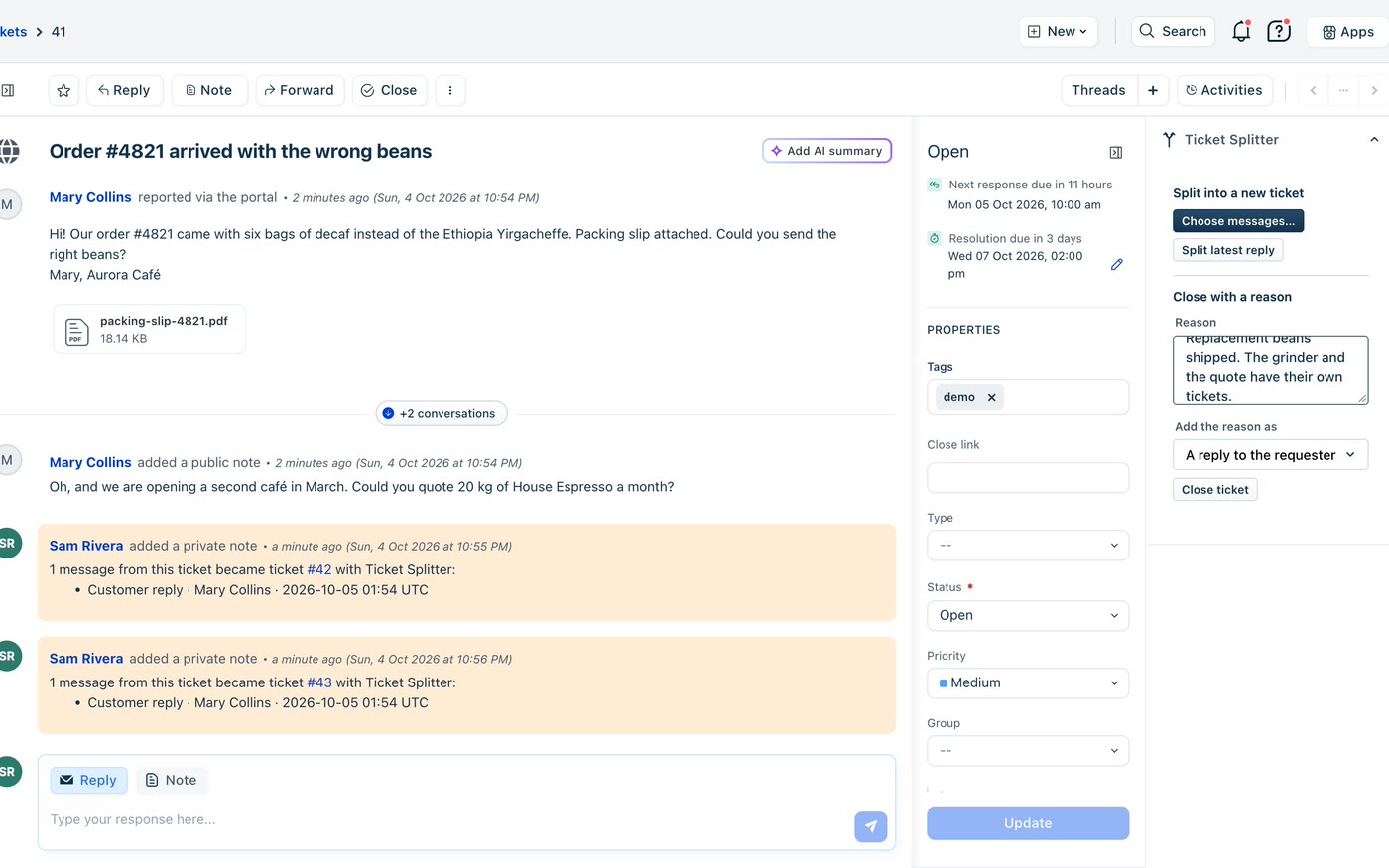
Two buttons and a reason, in the ticket sidebar.
Freshdesk’s own Split takes only the latest customer reply and no options. Ticket Splitter works on any message and lets the agent set up the new ticket before it is created. It talks only to your own Freshdesk, with no server or database of ours in between. An independent app by Red Lotus, an authorized Freshworks partner.
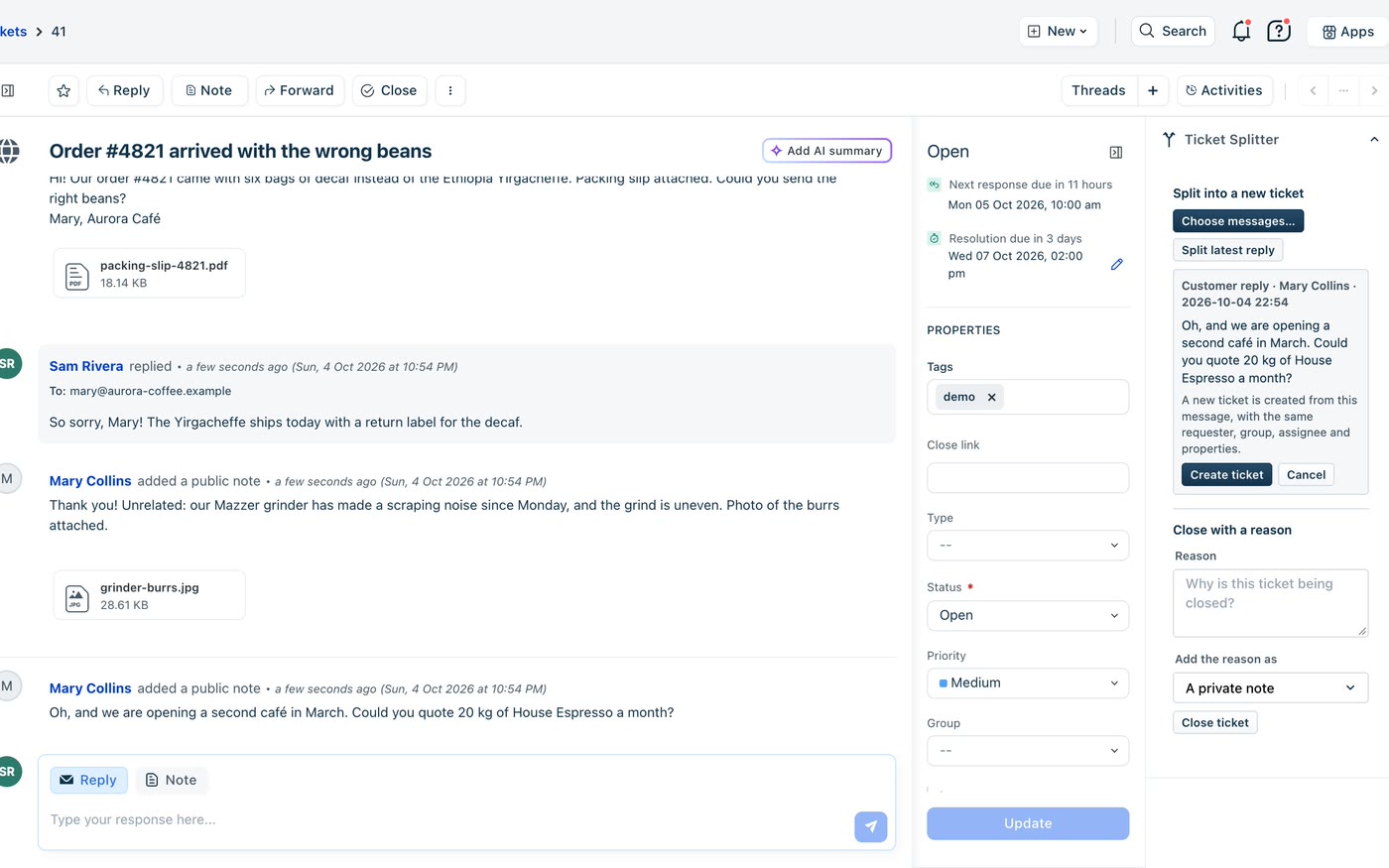
Split latest reply
The sidebar previews the customer’s latest reply. One more click creates a ticket from it, with the same requester, group, assignee and properties.
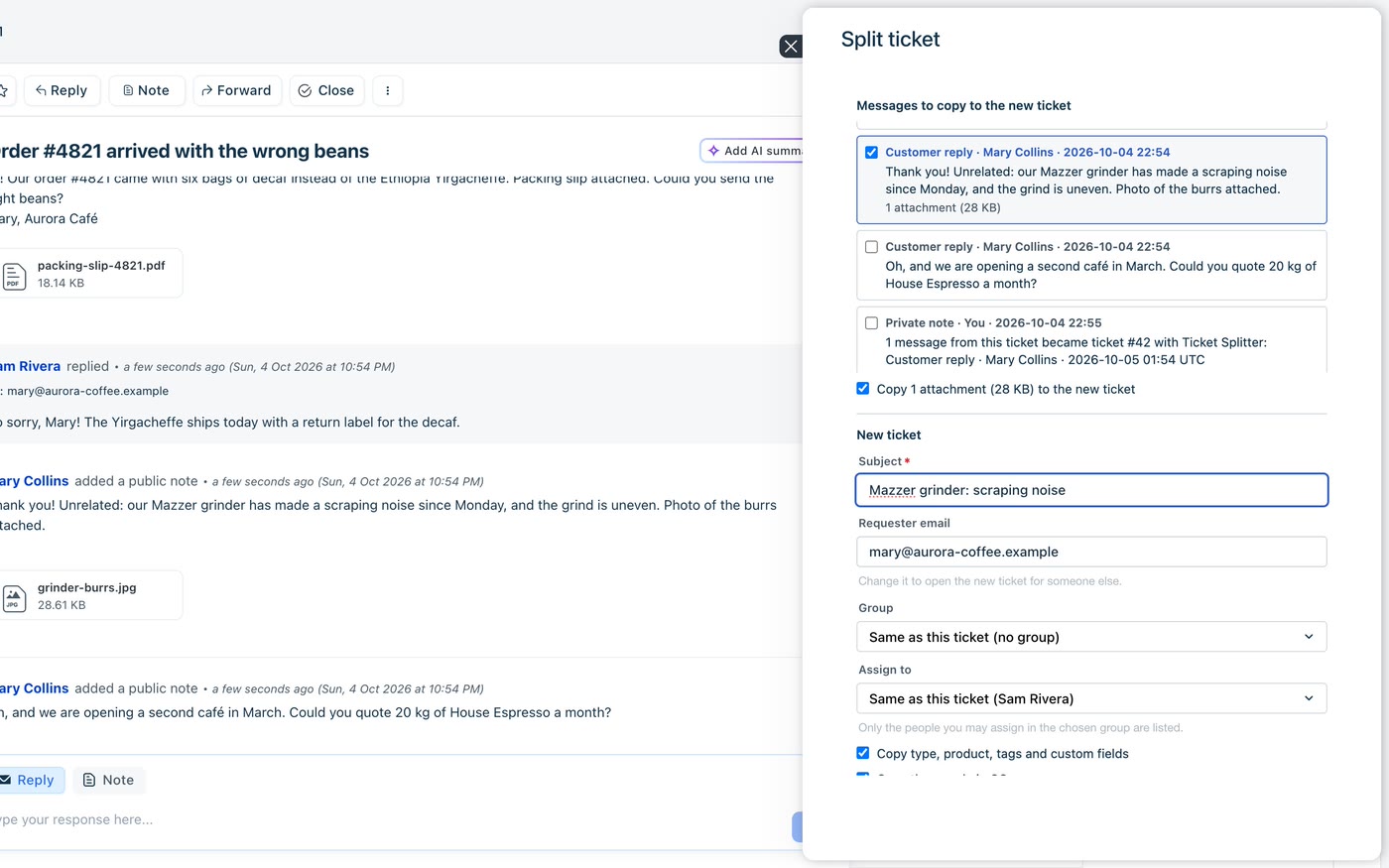
Choose any messages
The first message, any customer or agent reply, any note. Tick them, then set the subject, the requester by email, the group and the assignee, and choose what else is copied.
Close with a reason
Write why the ticket is being closed and add it as a private note or send it to the requester as a reply. The ticket is set to Closed or Resolved.
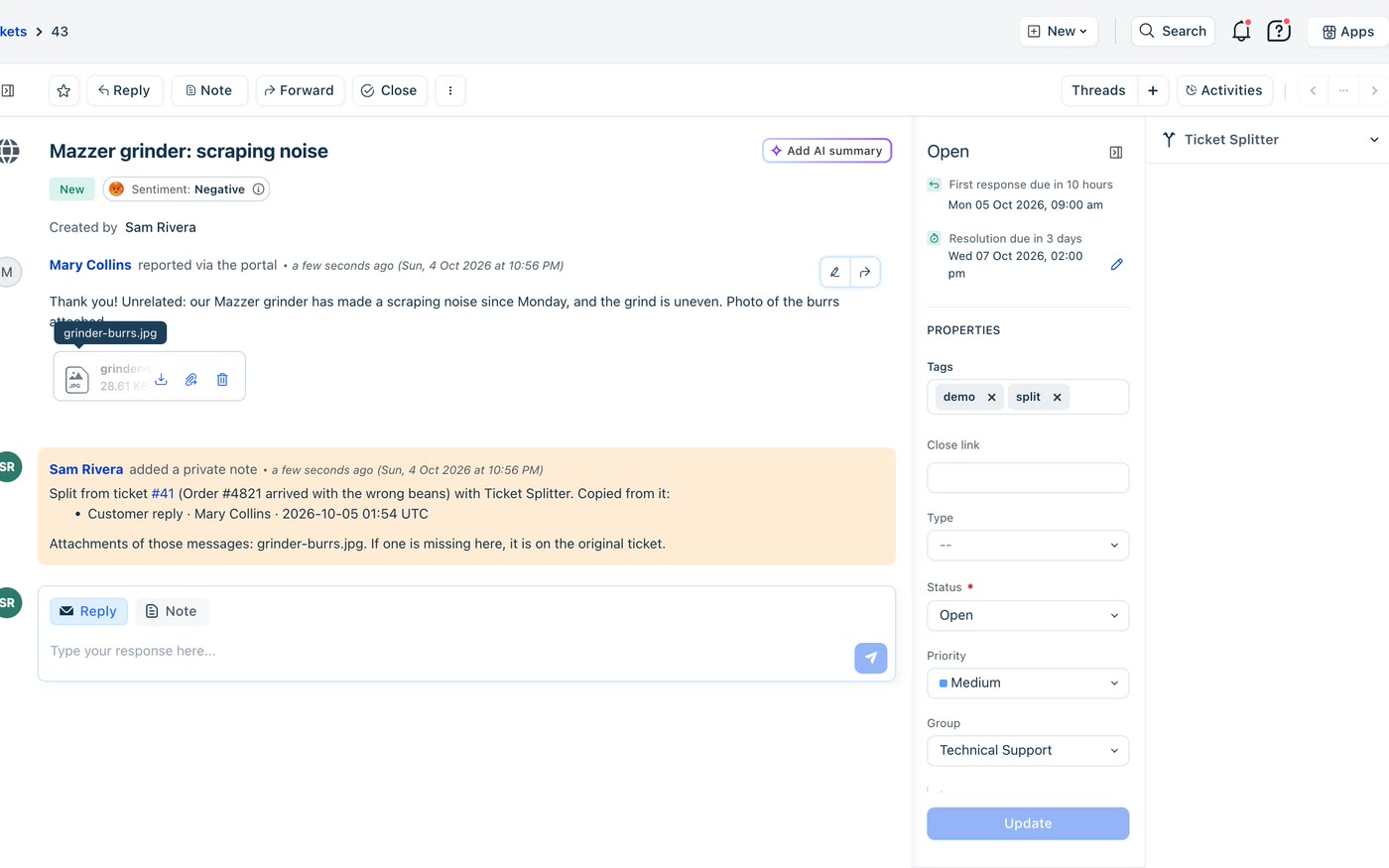
What the agent sees.
Captured in a real Freshdesk account with a fictional ticket from a made-up coffee shop: every name, e-mail address and order number below is invented.
For teams whose customers write about everything at once.
A customer reports a wrong order, a broken machine and asks for a quote in the same email. One team answers its part, the rest waits, and the reports count one ticket for three pieces of work. Splitting gives every request an owner.
Each team gets its own part
Send the repair to Technical Support and the quote to Sales, each with its own assignee, SLA and status.
Nothing gets lost
A private note on each ticket points to the other and lists what was copied. New tickets get a tag you choose, “split” by default.
The files come along
Attachments of the chosen messages are copied to the new ticket, up to 20 MB each, so whoever takes it has the photo or the invoice.
Someone else’s request
Change the requester by email when the request belongs to a colleague of the customer, such as purchasing asking for the quote.
Only where the agent can follow
The group and assignee lists follow the agent’s ticket scope: global, group or restricted access.
Safe to try again
If a step fails after the new ticket exists, Try again finishes only what is left. It never creates a second ticket.
Four fields to install.
Get an admin’s API key
From Profile settings of an admin: only an admin’s key can list the groups with their members. No custom fields, forms or automations are needed.
Install
Type the helpdesk domain, paste the key, and pick the tag for split tickets and whether a close with a reason sets Closed or Resolved.
Open a ticket
The Ticket Splitter panel is in the right sidebar of every ticket, for every agent.
It works on Freshdesk, on any plan with Marketplace apps. Notes and replies are posted in the name of the agent who clicked.
Your tickets stay in Freshdesk.
The app has no server of ours and no database of ours. It reads and writes tickets only through your own Freshdesk API, using the Freshworks platform. Ticket data is never sent to Red Lotus or to any other service, and the app keeps nothing of its own. Attachments are copied by a small function on the Freshworks platform that downloads only from Freshdesk’s own file hosts and uploads straight to the new ticket.
The Freshdesk API key is a secure installation parameter. The Freshworks platform keeps it encrypted, adds it to the request on the server side and never sends it to the browser. The app copies messages, it does not move them, and it never deletes anything.
Questions before you install.
How much does it cost?
USD 0.90 per Freshdesk agent per month. Freshworks does the billing, on your Freshworks account. We never see your payment details.
Are the messages moved or copied?
Copied. The Freshdesk API cannot move a message between tickets, and the app does not delete anything, so the original ticket keeps its full history.
What happens to a private note I split?
It becomes part of the new ticket’s description, which the requester can see. The window warns you before you create the ticket.
Are there limits?
A file over 20 MB is not copied: it is named, with the reason, and stays on the original ticket. Images pasted inside a message are copied with the message. Tickets with more than 1,000 replies and notes show the first 1,000.
Can an agent send a ticket to any team?
Only to the groups and people their ticket scope allows. Keeping the group and assignee of the ticket being split is always allowed.
Where do I get it?
It is on its way to the Freshworks Marketplace. Until it is listed, talk to us and we install it in your account as a custom app.
One request per ticket.
We install it, set the tag and the closing status with you and show your team where the buttons are. Come talk to us.
Back to all solutions