The order inside the ticket, before the agent asks.
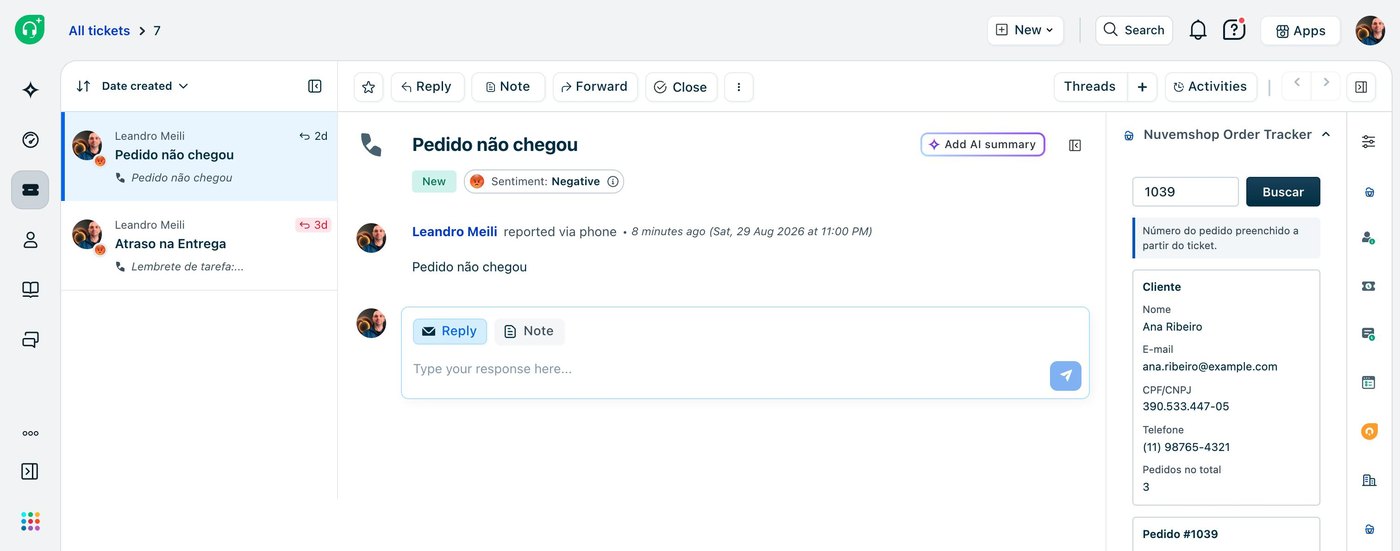
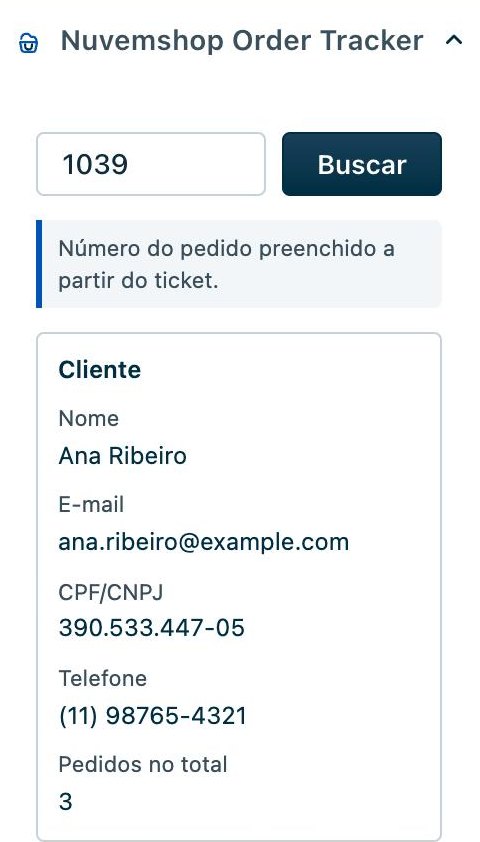
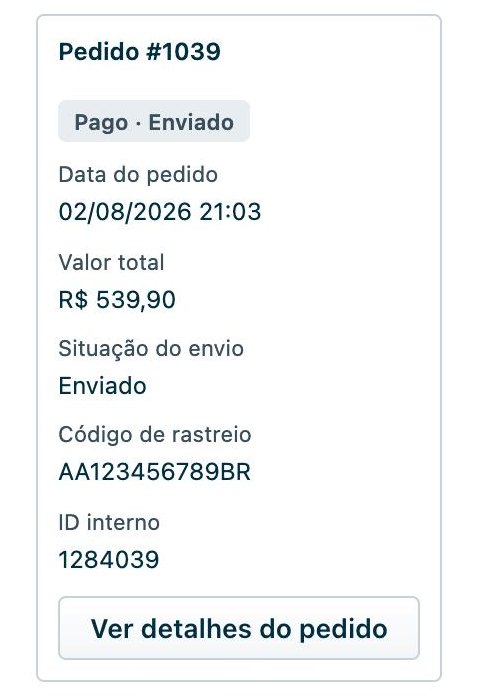
Nuvemshop Order Tracker is our own Freshdesk app. When the ticket already carries the order number, the sidebar has fetched the shopper and the order before the agent finishes reading the first line: items, payment, delivery, tracking code. One click writes the order number, the status and the tracking code back into ticket fields that belong to you.
Three places, and every value stays in your Freshdesk.
The app runs inside Freshdesk and keeps no database of its own. What it saves goes into ordinary ticket fields, which means views, automations, exports and reports can use it from then on.
In the ticket sidebar
The panel opens beside the conversation. It reads the order number from the ticket field you configured, and when there is none it falls back to a number quoted in the subject, then to the requester's e-mail address.
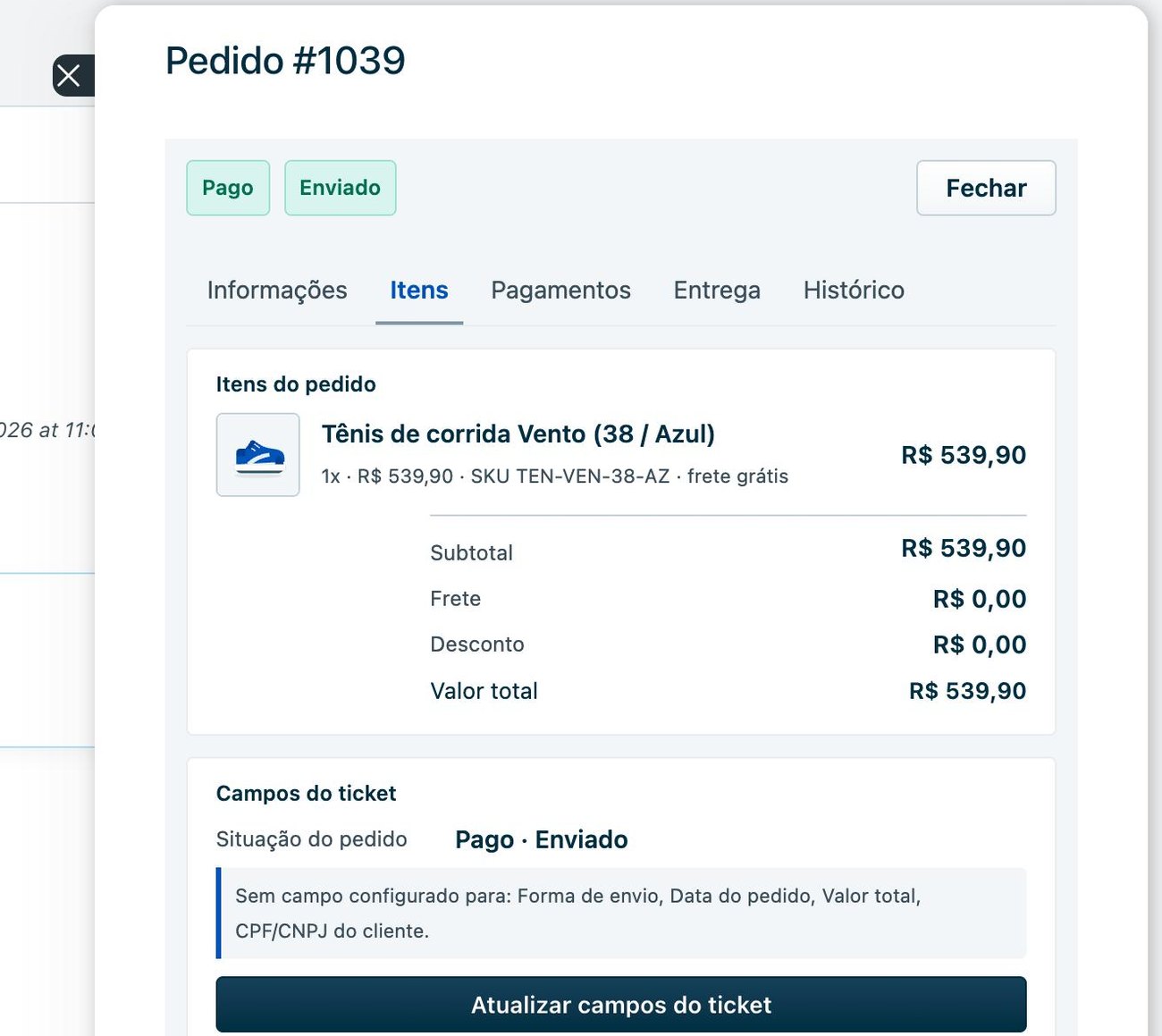
In the full order
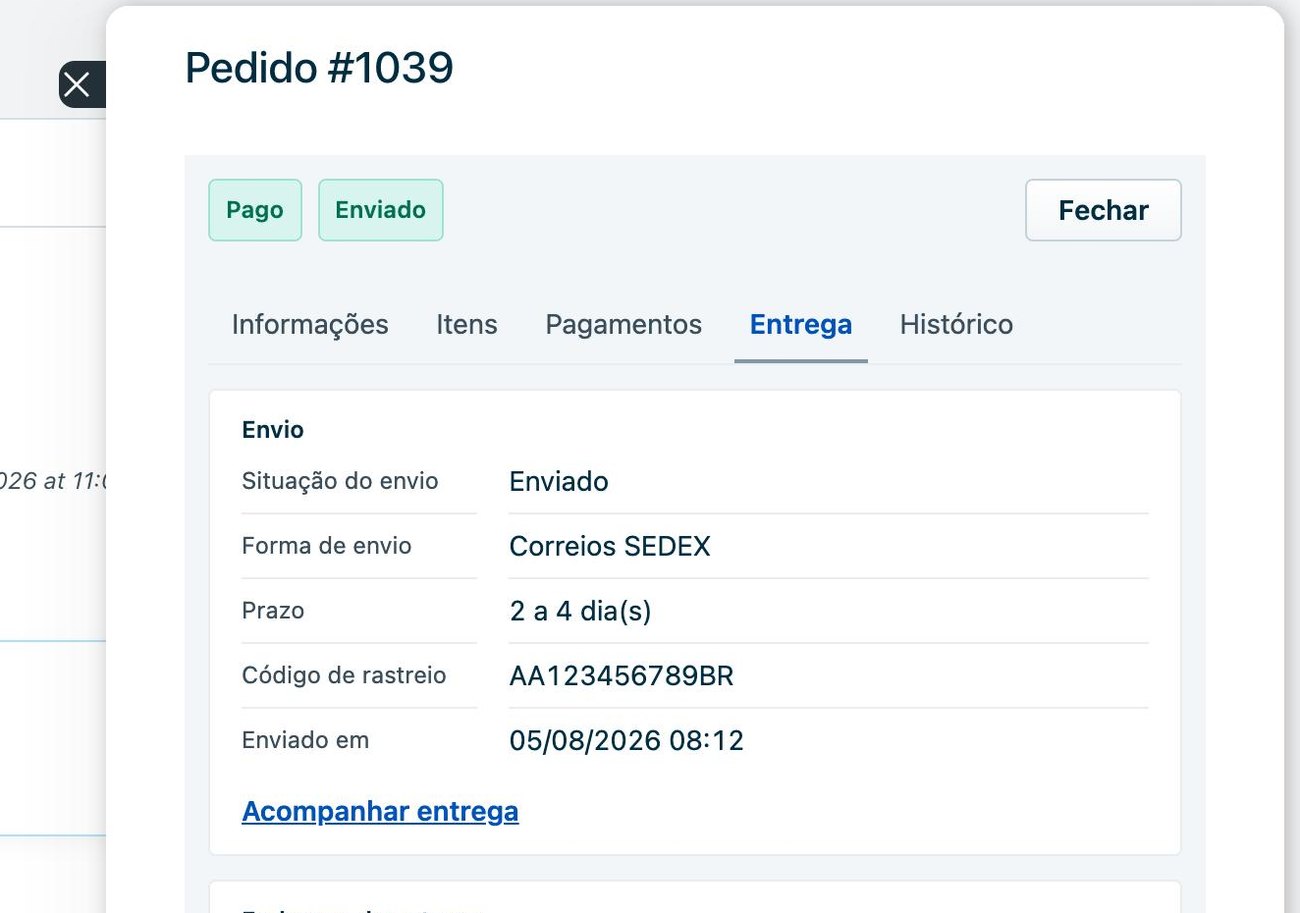
A wide modal with tabs for information, items, payments, delivery and history: item photos, SKUs, instalments, the carrier, the tracking code and the carrier's own link.
In your own fields
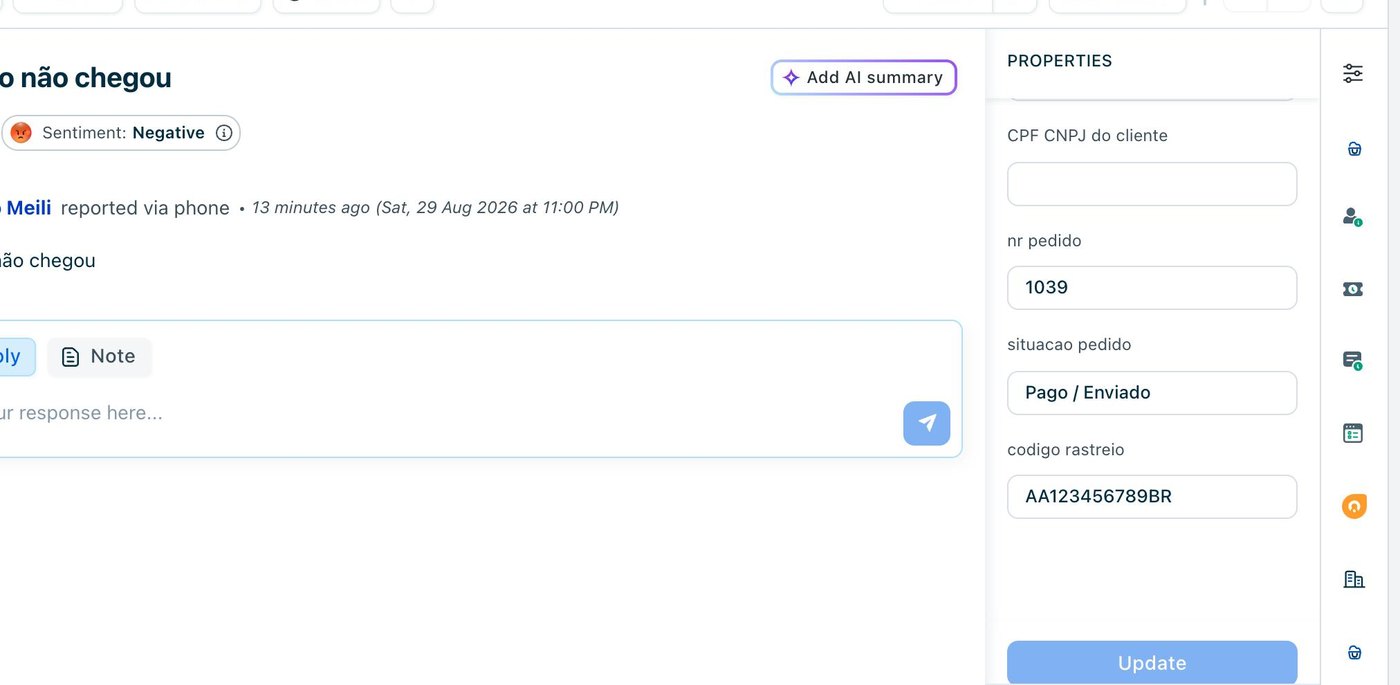
Order number, status, tracking code, carrier, order date, total and CPF/CNPJ go into the custom fields you created, automatically or when the agent presses the button.
What the agent sees in the ticket.
Screenshots taken in a real Freshdesk, with the app answering from its built-in demo store: every name, address and order number below is fictional.
Stores whose support queue is made of orders.
If your agents answer “cadê meu pedido?” all day, someone is copying an order number into another tab right now. With the app, the order shows up inside the ticket.
“Where is my order?”
The most common ticket in any store. The answer is a status and a tracking code, and both are on screen before the agent types a word.
Delivery running late
The delivery tab carries the carrier, the service, the estimate and the dispatch date, so the agent answers with a date instead of a guess.
Returns and exchanges
What was bought, at what price, in which variant and how it was paid: the whole order, before the conversation about sending it back starts.
Reporting on orders
Once the order number, the status and the total are ticket fields, any Freshdesk report can group and filter tickets by them.
Small teams
The agent stays in the ticket and never opens another system.
Nothing changes in the store
Every call the app makes to Nuvemshop is a read. It never edits an order, a customer or a shipment.
About ten minutes to install.
Create the ticket fields
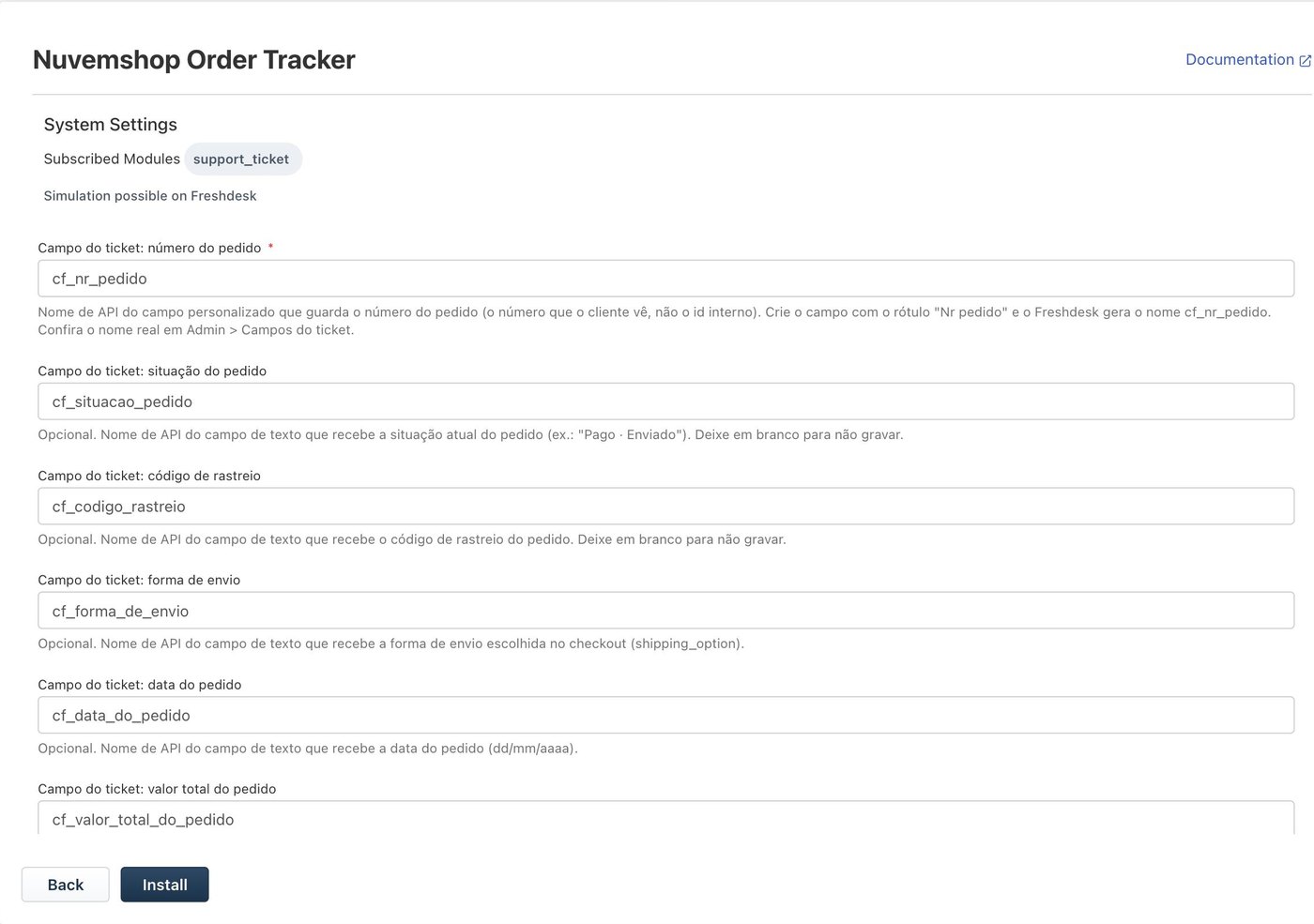
Single line text, one per value you want written: order number, status, tracking code, carrier, order date, total, CPF/CNPJ. Every one of them is optional: leave a mapping blank and the app skips that field.
Get a Nuvemshop token
An access token for your store, and the store id that comes back with it. A single store creates a private app in the store admin; a partner installs the app on the store through the partner panel.
Install and map the fields
On the installation page: the token and store id, your Freshdesk subdomain and an API key allowed to update tickets, then one API name per ticket field. You also choose whether the fields are written automatically or on the agent's click.
Open a ticket
The app appears in the right-hand sidebar. If the ticket carries an order number, it has already searched.
Prefer to look before handing over a token? Tick Modo demonstração on the installation page and the app answers from a built-in fictional store, calling no Nuvemshop API at all. The interface itself is in Brazilian Portuguese, on purpose: it is built for the Nuvemshop merchant base.
There is no server of ours.
We keep nothing on our side. The app is HTML and JavaScript running inside your Freshdesk account, with no backend, database or telemetry, and it talks to exactly two hosts: the Nuvemshop API and your own Freshdesk. Nothing reaches us. We could not read your orders if we wanted to.
The Nuvemshop access token and the Freshdesk API key are declared as secure installation parameters. The Freshworks platform encrypts them, substitutes them into the request server-side, and never returns them to the browser. Uninstalling the app removes them with it.
Everything arriving from Nuvemshop or from the ticket is written to the page as text, never as markup, so a value a shopper typed cannot execute in an agent's browser. Links that come from third parties (tracking URLs, product images) are used only when they are http or https addresses.
Questions before you install.
What does it cost?
It is a paid app: per Freshdesk agent, per month, starting with a free trial. Freshworks bills it on your Freshworks account, and the price and the trial length are stated on the Marketplace listing. We never see your payment details.
What if the ticket has no order number?
The app falls back to an order number quoted in the subject, and then to the requester's e-mail address. The agent can also type an order number, an e-mail or a CPF/CNPJ into the box by hand.
Which order number does it use?
The one the shopper sees. Nuvemshop identifies an order by an internal id and shows the customer a different number; the app reads and writes the customer-facing number and uses the id only to call the API. Mixing the two up would show somebody else's purchase.
Does it change my tickets on its own?
Only the fields you mapped, and only if you turned automatic updates on. Otherwise nothing is written until an agent presses “Atualizar campos do ticket”.
Which Freshdesk plan do I need?
One with ticket custom fields and API access. The app writes through the Freshdesk API using a key you supply, so the key's agent needs permission to update tickets.
Where do I get it?
It is on its way to the Freshworks Marketplace. Until it lands there, talk to us and we install it in your account as a custom app.
Can it be customised?
Yes. The code is ours, so another field, another fallback or a link into your ERP is something we can quote as a project.
Answer “where is my order?” without leaving the ticket.
We install it, map your fields and walk your agents through it. Come talk to us.
Back to all solutions